I did not expect it to take so long to get the Vibrant Visuals added to my Minecraft game (for Playstation 5).
Who would have thought you’d need to go all the way to the bottom of settings–the main screen settings not the settings for a specific world–and click on “Get Minecraft Preview.” Then you have to download the (thankfully free) preview version of Minecraft. Once it’s downloaded then you have to sign into your account. And then stand on your head, whistle “Dixie,” and sacrifice a goat to docm77–a little Hermitcraft humor there. OK, so I was kidding about that last part. I did, however, have trouble turning them on. For some reason, the game didn’t want to select them. I had to quit and came back before they worked.
The Vibrant Visuals weren’t as grand as I thought they’d be. They are still pretty cool. I like the shadows on everything, and they move as the Sun moves. You can see shadows on mobs like the sheep. Where there should be a shadow, there is.


I was a little afraid that it might look…plastic; but no, they look good. The water looks like water. It doesn’t look hyper-real but also not weird unrealistic. I also liked seeing the shadow of the Happy Ghast as it flew over the village. It made the place feel more alive.
However, the longer I stayed with the Visuals on, the more accustomed I became and I started to lose the amazement. Then night came.

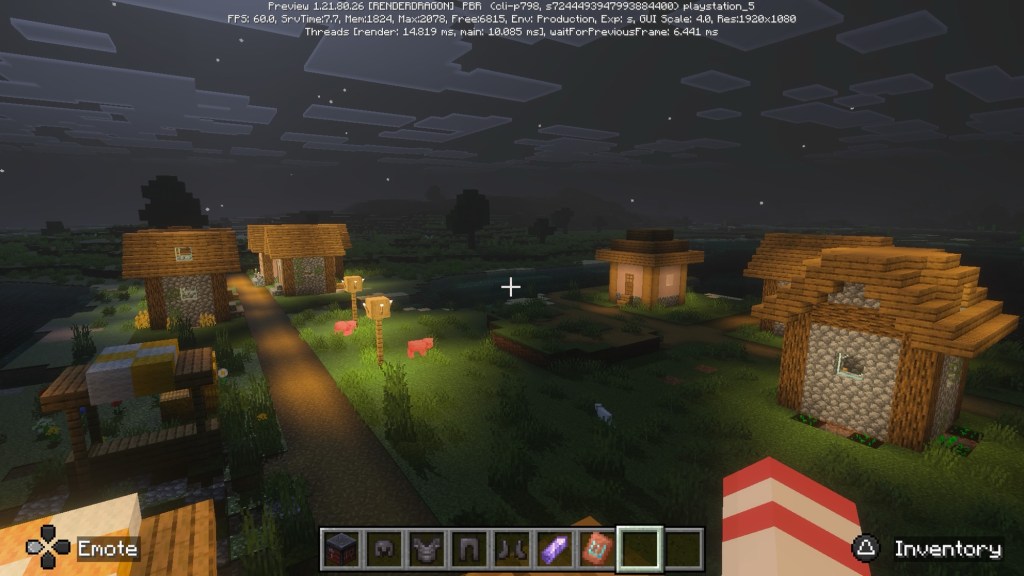
The night sure raised the mood factor. I definitely started to feel a little more alone…in a village…at night…with zombies and spiders. It sure made me want to get a sword or armor.
I would agree with others in that the Vibrant Visuals is something you want to use sparingly, like to see how the light hits your build or see how awesome it looks at night. It’s a real fun addition.
Until the next wormhole…thanks for reading!
Please like, follow, and share!
📚Tails From the Omniverse is a Superman x NeverEnding Story fantasy adventure mixed with some Hitchhiker’s Guide-like humor for MG and YA readers. Pick up your copy today.
 Joe Rover
Leave a comment